git
stash:存储临时代码。

reset --soft:软回溯,回退 commit 的同时保留修改内容。

cherry-pick:复制 commit。

revert:撤销 commit 的修改内容。

reflog:记录了 commit 的历史操作

git init

git add .

git commit -m "xxxx"

git remote add origin xxxx.git

git push -u origin master

git config --global color.ui auto

git config --global --edit

git blame <filename> -L n,m

git config --global core.autocrlf true

git log xxxxx

git log --graph --oneline --decorate

git ls-files | xargs cat | wc -l

git log --pretty=tformat: --numstat | awk '{ add += $1; subs += $2; loc += $1 - $2 } END {printf "added lines: %s, removed lines: %s, total lines: %s\n", add, subs, loc }'

git archive --format=zip --prefix=git-docs/ HEAD:Documentation/ > git-1.4.0-docs.zip

git grep

git log --pretty=format:"%an" <file> | sort -u

git blame --date=format:"[%Y-%m-%d %X]" <file>

git diff --stat dev xxx


git shortlog -sn

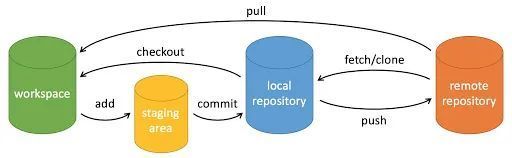
git pull = git fetch + git merge


git config --global http.sslVerify false


git config --global core.autocrlf false

git config --global core.filemode false

git config --global core.safecrlf false


git config --local core.autocrlf false

git config --local core.filemode false

git config --local core.safecrlf false

git rev-parse HEAD

git log --graph --pretty=format:'%Cred%h%Creset -%C(yellow)%d%Creset %s %Cgreen(%cr) %C(bold blue)<%an>%Creset' --abbrev-commit --date=relative -n 3


git init --initial-branch=main

git remote add origin xxxx.git

git add .

git commit -m "Initial commit"

git push --set-upstream origin main


1、git reset:用于撤销或回退Git仓库中的更改。相当于后悔药,给你重新改过的机会。

2、git revert:用于撤销已经提交的一个或多个提交,同时保持这些撤销操作的历史记录。

3、git rebase: 允许你将一系列提交从一个分支移到另一个分支上,以此来重组提交历史,使历史更加清晰和线性化。

4、git cherry-pick: 用于将一个或多个提交从一个分支复制并应用到另一个分支上。

5、git stash: 允许你暂时将未完成或未提交的工作存储起来,从而使工作目录恢复到一个干净的状态,便于切换分支等其他工作。

6、git reflog: 用于记录你的仓库中的每一次分支引用变动历史,包括提交、切换分支、重置、合并等操作,便于后续查阅。

git diff dev xxxx --ignore-blank-lines --stat --ignore-space-change


cd /path/to/your/repo

git remote -v

git remote set-url origin xxx

git remote -vgit



撤销 commit
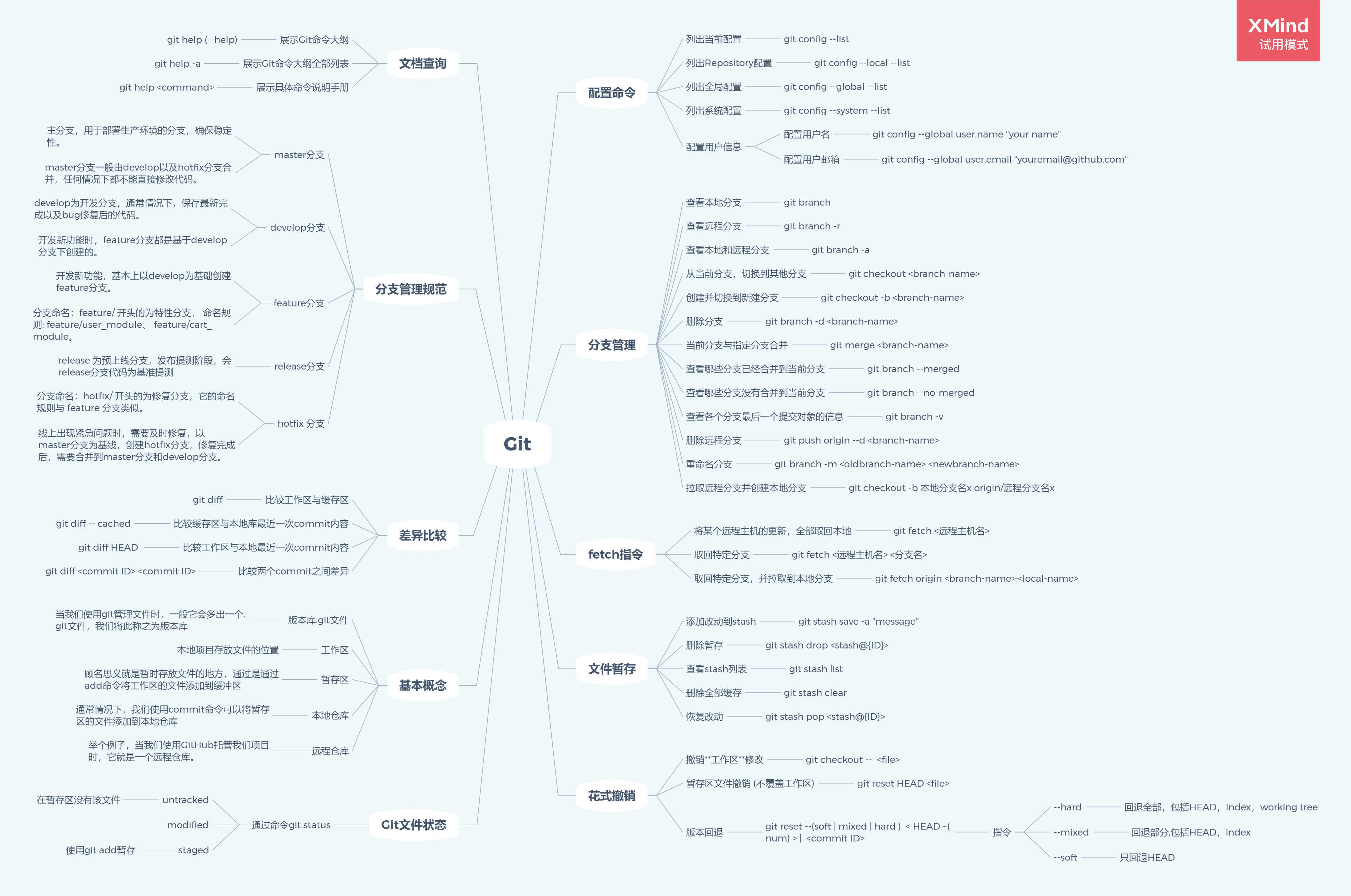
git reset --soft HEAD^ 撤销 commit。
git reset --hard HEAD^ add 也撤销了
HEAD^ 表示上一个版本,即上一次的 commit,几个^代表几次提交,如果回滚两次就是 HEAD^^。 也可以写成 HEAD~1,如果进行两次的 commit,想要都撤回,可以使用 HEAD~2。
--soft 不删除工作空间的改动代码 ,撤销 commit,不撤销 add --hard 删除工作空间的改动代码,撤销 commit 且撤销 add 如果 commit 后面的注释写错了,先别急着撤销,可以运行 git commit --amend 进入 vim 编辑模式,修改完保存即可
git ssh
ssh -T git@gitlab.xxx.net
需要 公钥 使用SSH公钥可以让你在你的电脑和 Gitee 通讯的时候使用安全连接(Git的Remote要使用SSH地址)
生成公钥 ssh-keygen -t rsa -C "test@qq.com"
迁移
cd <项目目录>
git fetch --all
git fetch --tags
git remote rename origin old-origin #可以不保留
git remote add origin http://***(项目的新仓库地址)
#git remote set-url origin <项目的新仓库地址>
git push origin --all
git push --tags
有多个分支的话,就切换到另一个分支提交:
git checkout dev(分支名称)
git push origin -all


方法一:

git clone repo1.git && cd repo

$ git pull && git pull --tags

$ git remote set-url origin repo2.git

$ git push && git push --tags


方法二:

git clone --mirror  repo1.git

git push --mirror  repo2.git

方法三:


$ git clone --bare repo1.git
$ git push --mirror  repo2.git


裸仓库是 git 中的一个概念,只要在克隆时加一个 -–bare 选项即可。

裸仓库可以再次push到另一个源,所以可以完成我们仓库迁移的任务。

需要注意,克隆下来的裸仓库中只有 .git 内容,是没有工作目录的。这是不同于镜像仓库的地方。git hooks
Git Hooks 就是 git 流程中不同的生命周期回调。

husky 是一个 Git Hooks 工具,借助 husky 我们可以在 git 流程的不同生命周期进行一些自动化操作github action
name: Batch-Client
on:
  push:
    branches: [ "main" ]
  pull_request:
    branches: [ "main" ]
  schedule:
    - cron: '0 16 * * *'
jobs:
  build:
    runs-on: ubuntu-latest
    steps:
    - name: setup timezone
      uses: zcong1993/setup-timezone@master
      with:
        timezone: Asia/Shanghai
    - name: checkout
      uses: actions/checkout@v4
    - name: set
      uses: actions/setup-python@v5
      with:
        python-version: ">=3.12"
        cache: 'pip'
        cache-dependency-path: |
              **/requirements*.txt
    - name: install
      run: |
        pip install -r batch/requirements.txt
    - name: run
      run: |
python batch/batch.pyGit 使用规范流程
第一步:拉取代码
普通取代码
$ git clone git@code.aliyun.com:bingtuan/xxx.git

指定分支maindev取代码
$ git clone -b maindev git@code.aliyun.com:bingtuan/xxx.git

第二步:创建分支
首先,每次开发新功能,都应该新建一个单独的分支。
1. 获取开发分支的最新代码
$ git checkout maindev
$ git pull

2.新建一个开发分支xxfeature_20180829
$ git checkout -b xxfeature_20180829

第三步:提交分支commit
分支修改后,就可以提交commit了。
$ git add --all
$ git status
$ git commit --verbose

git add 命令的all参数,表示保存所有变化(包括新建、修改和删除)。从Git 2.0开始,all是 git add 的默认参数,所以也可以用 git add . 代替。
git status 命令,用来查看发生变动的文件。
git commit 命令的verbose参数,会列出 diff 的结果。也可以使用git commit -m "xxxxxx" 直接commit,不会有以下第四步。
第四步:撰写提交信息
提交commit时,必须给出完整扼要的提交信息,下面是一个范本。

#
# Please enter the commit message for your changes. Lines starting
# with '#' will be ignored, and an empty message aborts the commit.
#
# On branch xxfeature_20180829
# Changes to be committed:
#       new file:   html/git_bingtuan_use.html
#
# ------------------------ >8 ------------------------
# Do not touch the line above.
# Everything below will be removed.
diff --git a/html/git_bingtuan_use.html b/html/git_bingtuan_use.html
new file mode 100755
index 0000000..f7fc981
--- /dev/null
+++ b/html/git_bingtuan_use.html
...


第五步:与主干同步
分支的开发过程中,要经常与开发主分支保持同步。
$ git fetch origin
$ git rebase origin/maindev

git pull与git fetch都是从远程获取最新版本到本地,但git fetch不会自动merge;
git rebase与git merge都有可能产生冲突,但是解决的方法不一致;
在rebase的过程中,也许会出现冲突(conflict). 在这种情况,Git会停止rebase并会让你去解决 冲突;在解决完冲突后,用git-add命令去更新这些内容的索引(index), 然后,你无需执行 git-commit,只要执行:
$ git rebase --continue
这样git会继续应用(apply)余下的补丁。
在任何时候,你可以用--abort参数来终止rebase的行动,并且xxfeature_20180829 分支会回到rebase开始前的状态。
$ git rebase --abort

在merge的过程中,也许会出现冲突(conflict),此时Git会merge完成后会列出结果,Auto merge or conflict文件,此时需要解决冲突,解决完之后使用以下命令重新commit;
$ git add git_bingtuan_use.html
$ git commit -m "conflict fixed"
以下冲突示例,解决的过程中需要注意不要误删其他同事代码

团队开发中,遵循一个合理、清晰的Git使用流程,是非常重要的。
<<<<<<< HEAD
每个人都提交一堆杂乱无章的commit,项目很快就会变得难以协调和维护。.
=======
否则,每个人都提交一堆杂乱无章的commit,项目很快就会变得难以协调和维护。
>>>>>>> xxfeature_20180829
1
2
3
4
5
6
Git用<<<<<<<,=======,>>>>>>>标记出不同分支的内容,此时修改请注意不要误删代码,此时只需要被认为需要留下的即可,修改结果如下:

团队开发中,遵循一个合理、清晰的Git使用流程,是非常重要的。
否则,每个人都提交一堆杂乱无章的commit,项目很快就会变得难以协调和维护。
1
2
第六步:推送到远程仓库
提交commit后,就可以推送当前分支到远程仓库了。
$ git push origin xxfeature_20180829
如果本地reset或者合并commit等其他的操作,导致head指向变更,可以在push后加–force强制推送。

第七步:发出Merge Request
登录到code.aliyun.com发起Merge Request到maindev,然后需要相关人士进行代码review,确认可以合并到maindev。

第八步:上线流程
测试环境从maindev拉取测试代码;
预发需要将代码merge到master分支,预发与生产环境只允许在master分支;
上线完成后以master分支的代码checkout一个release_vx.x.x分支(x.x.x相关规则参考自己的项目)。最终将release_vx.x.x分支分支推送到远端仓库。
第九步:修复线上bug
以master分支代码checkout出hotfix_20180829,修改代码后参考第六步,第七步,第七步中发起Merge Request到master。上线完成后将该部分修改代码分别merge到maindev和相关release_vx.x.x分支。

第十步:删除本地远程分支

git switch dev

git branch -d dev_xxx

 git push origin --delete dev_xxx

 第十一步:打tag

git tag -ln

git tag -a vxxxx -m xxx

git push origin vxxxxgit 合并merge后如何撤回
要撤回合并(merge)操作,可以使用git的"git reset"命令或者"git reflog"命令。下面是两种方法的具体步骤:

方法1:使用"git reset"命令

首先,使用"git log"命令查看合并操作的历史记录,找到要撤回的合并操作的commit ID。
使用"git reset --hard "命令,将当前分支的指针移动到指定的commit ID,同时撤销合并操作。注意,这个操作会删除合并操作之后的所有提交。
使用"git push origin --force"命令,将本地分支的更改强制推送到远程仓库。

方法2:使用"git reflog"命令

使用"git reflog"命令查看所有的git命令历史记录,找到要撤回的合并操作的commit ID。
使用"git reset --hard "命令,将当前分支的指针移动到指定的commit ID,同时撤销合并操作。
使用"git push origin --force"命令,将本地分支的更改强制推送到远程仓库。
在使用这些命令之前,请确保你了解它们的风险,并在必要时备份你的代码。


git revert -m 1 <merge commit ID>git push撤销 git commit撤销 git add撤销 修改git提交信息 恢复文件到上一次提交时的样子
一、git push撤销

代码已经修改并push到远程分支,想撤回到前几个版本,并且会删除本地代码所做的修改!


撤销第二、第三次提交代码,回到第一次提交代码


1.获取第一次提交commit版本号
   git log
2. 将本地代码撤销至目标commit版本(高危操作,请明确利害关系)
  git reset --hard xxxx
3. 覆盖远程分支代码(高危操作,请明确利害关系)
  git push --force

二、git commit撤销

  代码已经git add,并且git commit,但是还没有git push

 git reset --soft HEAD~1

## 如果进行了2次commit,想都撤回,可以使用:
git reset --soft HEAD~2

三、git add撤销

代码已经执行了git add操作,想撤销git add操作

 ## 全部撤销
git reset HEAD

## 指定文件撤销 git reset HEAD <file>,文件名可通过git status命令获取。
git reset HEAD xxx.java


四、修改git提交信息

不修改代码内容,只修改commit信息,在git commit操作之后,git push操作之前。如果你在git push之后操作,也会将本地commit信息变更,但是这样会导致与远程分支信息不一致,所以尽量不要在git push之后操作。

git commit --amend


五、恢复文件到上一次提交时的样子

文件做了很多修改,但是还没有git add,又不想一步步回退。

## 文件名可通过git status命令获取
git checkout -- xxx.java


# git reset --hard 7af1e16d3175f171c8192fa578d78c419f657341

# git push origin HEAD --forcerevert reset
reset命令是重置到一个记录:git reset是将之前的提交记录全部抹去,将 HEAD 指向自己重置的提交记录;

revert命令是撤回一个记录;git revert 操作是撤回某一次提交记录,若之后又有提交,提交记录还存在。


revert含有Merge项信息的commit,需要指定 -m 参数。
1代表主分支开始merge操作的位置的commit;
2代表被合入分支的最顶端的commit;
1和2之间的所有commit(包括2),就是该次merge操作所带入的新内容。-m 1就代表回滚该次merge所带入的全部内容(即保留1,回滚掉 (1-2] ,抽掉之间的全部commit)
git revert xxxx -m 1

注:如果分支一直处于REVERTING状态,可能是你最后选择了保留新内容,所以此次回滚没有意义,这时可以选择终止revert操作
git revert --abortcherry-pick
git cherry-pick <commit id>:单独合并一个提交
git cherry-pick -x <commit id>:同上,不同点:保留原提交者信息。

git cherry-pick <start-commit-id>..<end-commit-id>
git cherry-pick <start-commit-id>^..<end-commit-id>

有"^"标志的表示把<start-commit-id>到<end-commit-id>之间(闭区间,包含start-commit-id)的提交cherry-pick到当前分支
无"^"标志表示把<start-commit-id>到<end-commit-id>之间(左开右闭,不包含start-commit-id)的提交cherry-pick到当前分支,不包含start-commit-id